 Case Study
 Gigz: A Concert Journaling App for Music Fans
How do you help music fans preserve and revisit their concert history without making it feel like a chore?
Version 1 shipped in November 2024. Version 2.0 shipped in September 2026.
Role
Solo Product Designer & Developer
Timeline
2024–2026
Platform
iOS (Live on the App Store), Android in development
THE PROBLEM
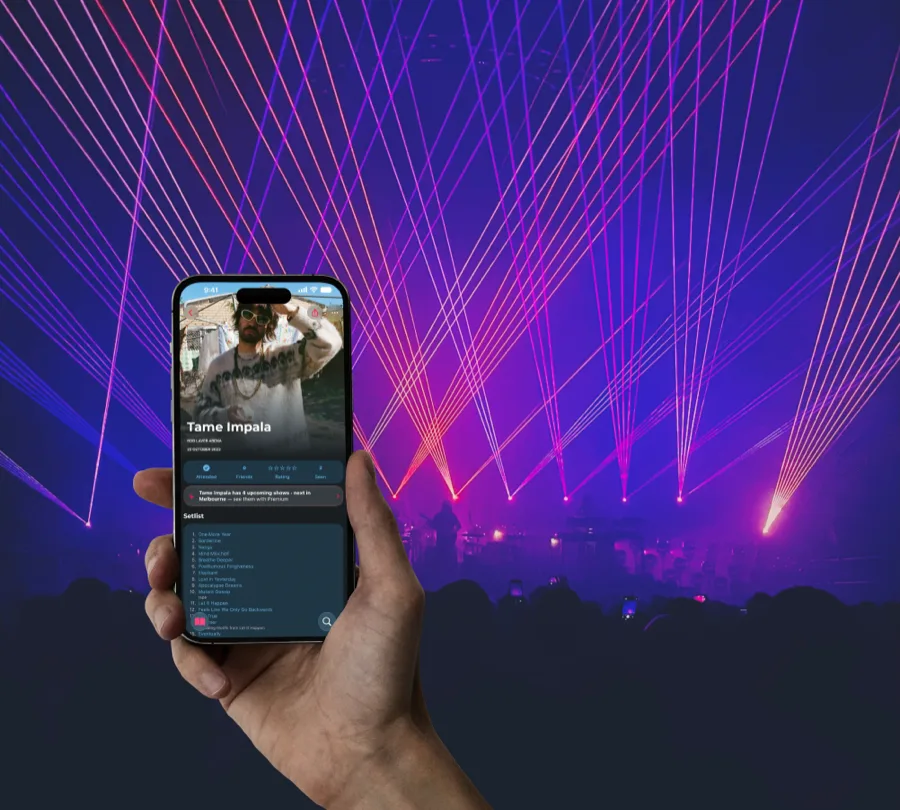
Music fans go to dozens, sometimes hundreds of shows over their lifetime. But most have no good way to remember them.
Think about it. What was that band you saw at The Corner Hotel in 2008? Who opened for them? What songs did they play? What did it feel like?
Right now, people cobble together workarounds: scrolling through old Instagram posts, saving Stories to highlights, keeping scattered notes in their phone, or maintaining spreadsheets. None of these are designed for the job. They're fragile, disconnected, and they don't capture the richness of a live music experience.
I wanted to build something that did.
The insight was twofold: this started as a personal pain point. I'm getting older and didn't want to forget the shows from my early years. But the more I looked into it, the more I saw a gap. There was no dedicated, thoughtfully designed tool for concert journaling that treated the experience with the care it deserved.
Version 1 shipped and solved that problem, but living with it for a year surfaced a second one. Adding a show meant typing in the artist, the venue, the date, the setlist, by hand, every time. A diary that feels like data entry doesn't get kept, and that's exactly what people did with it.
RESEARCH
It started as my own pain point, but I didn't want to design for an audience of one. Before committing to a direction, I did two kinds of lightweight research to pressure-test the idea against real people.
1:1 conversations with concert-goers
I ran informal interviews with friends and acquaintances across the spectrum, from once-a-year casuals to people with decades of shows behind them. I wasn't pitching an app; I asked how they remember shows today, what they wish they could look back on, and where their current workarounds let them down.
Listening to the wider community
I spent time in music forums, subreddits, and the App Store reviews of adjacent apps to learn the language fans actually use and the gaps they complain about, so the product would speak their vocabulary, not mine.
Living with version 1
The most valuable research came after launch: watching what real users did, and didn't do, over roughly a year on the App Store and in TestFlight.
What I heard
- People remember feelings and moments, the photo, the support act, that one song, far more vividly than dates and venues.
- Almost everyone had a “lost history” regret: early shows they could no longer reconstruct.
- Existing workarounds (Instagram, Notes, spreadsheets) were described as effort, not joy.
- Setlists came up again and again as the detail that snaps a memory back into focus.
What a year with version 1 showed
- Manual entry was the biggest drop-off point. Most people logged a few shows and then stopped.
- Shows entered by hand were inconsistent, spellings, venue names and so on, which made any kind of stats impossible.
- People wanted to know about upcoming tours for artists they'd already seen.
- Friends wanted to compare histories with each other, but nobody asked for a public profile.
How it shaped the design: the first round of findings defined the two user types below, pushed me toward a visual card-based timeline rather than a list, and made photos and setlists first-class features rather than afterthoughts. The second round, a year later, became the brief for version 2.0: replace manual entry with recognition, make records consistent enough to power stats, and add just enough social to compare with friends, without ever making the app feel public.
TARGET USERS
The interviews surfaced two overlapping groups:
The Nostalgic Fan
Someone who's been going to gigs for years or decades and wants a way to look back. They might remember the headliner but not the support act, the venue but not the date. They want to reconstruct and preserve their concert history.
The Active Tracker
Someone who goes to shows regularly and wants to log them as they happen. They care about setlists, venues, and building a visual record of their music life over time. They also want to know the moment a favourite artist announces a new show.
Both groups share a common need: a single, beautiful place to keep their concert memories, something that feels more intentional than a notes app and more personal than a social feed.
LANDSCAPE
Before designing, I mapped how people were currently solving this problem:
| Method | Strengths | Weaknesses |
|---|---|---|
| Instagram grid/stories | Visual, social proof | Not searchable, stories expire, no setlist data |
| Notes app | Quick, always available | No structure, no photos, hard to browse |
| Spreadsheets | Structured, sortable | Ugly, no emotional connection, no images |
| Setlist.fm | Great setlist data | Not a personal journal, community-focused not me-focused |
| Memory alone | Zero effort | Unreliable: details fade fast |
| Gigz v1 | Personal, visual, setlists | Manual entry, no social, no upcoming shows |
The key gap: nothing combined personal journaling (my photos, my memories) with structured music data (setlists, venues, dates) in a way that was easy to use and beautiful to look through.
DESIGN PROCESS
Information architecture
The core question was: what's the right mental model for a concert journal?
- List-based (like a notes app): too utilitarian, no visual delight
- Calendar-based: good for active trackers but bad for retroactive logging
- Card-based timeline: visual, scannable, grouped naturally by time
I landed on a card-based timeline grouped by year . Each card shows the artist, venue, date, and a cover photo, giving users an immediate visual anchor for each memory.
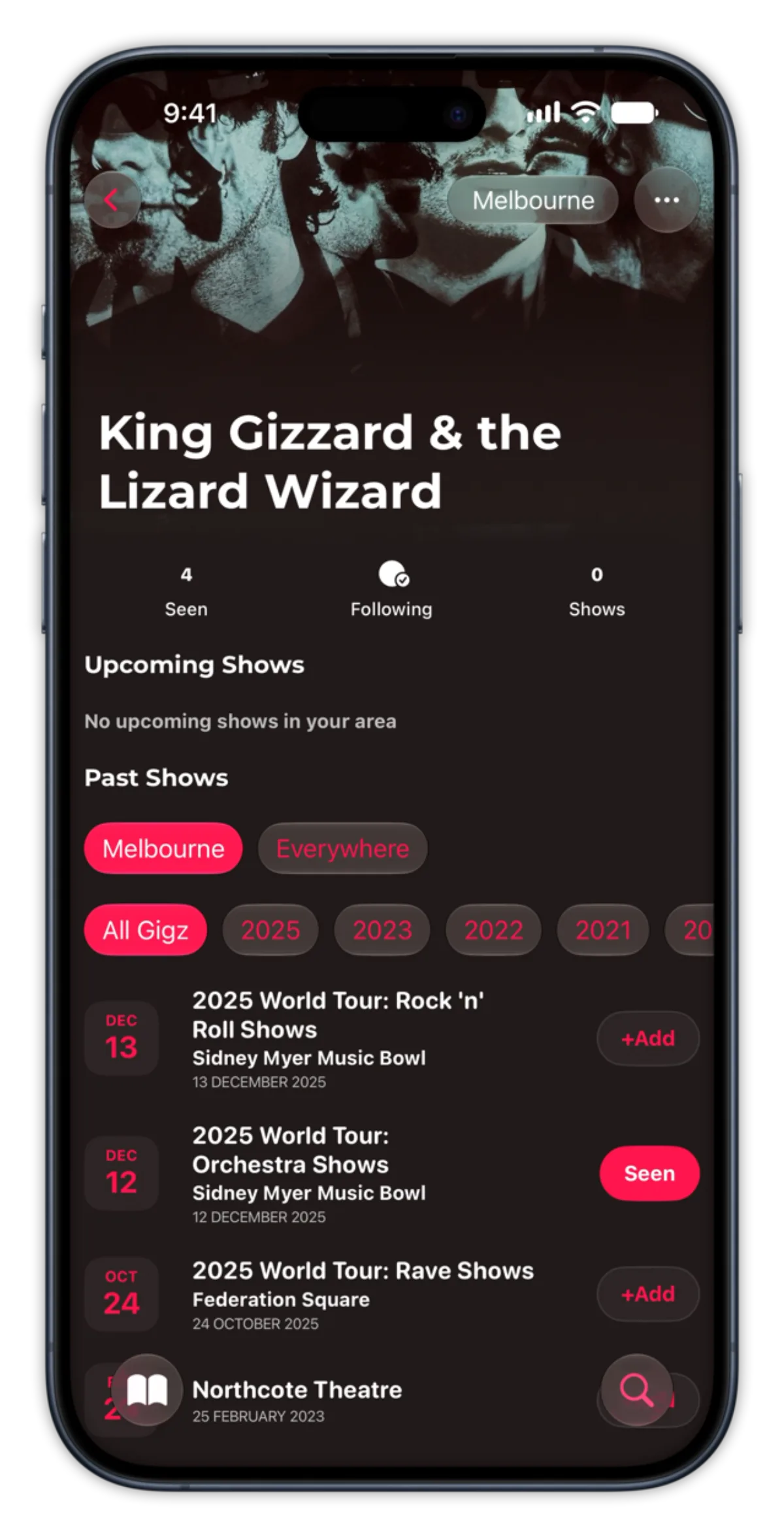
2.0 evolved this again. The timeline is now a list, with a row of year pills across the top (All gigz, 2026, 2025, 2024, and so on) that you scroll horizontally and tap to jump straight to a year. The grouping-by-year idea survived; the endless scroll didn't.
The timeline scaling challenge
This was the biggest design challenge in the project.
A card-based timeline works beautifully when someone has logged 10–20 shows. But what happens when a power user has logged 200+ shows across 15 years?
The problem: If every show gets a full-size card regardless of volume, users with rich histories would face endless scrolling. But if cards are too compressed, you lose the visual impact that makes the journal feel personal.
Version 1's approach: adaptive card density thresholds based on the number of shows within a year grouping: full-size cards at low volume, compact cards at medium volume, condensed list entries at high volume. It worked, but it was still one long scroll, just with the cards shrinking as you went.
Version 2.0's approach: stop compressing the scroll and remove it instead. A horizontally scrollable row of year pills sits above the list, so someone with 300 shows across 15 years jumps straight to 2019 instead of scrolling past 280 entries to get there. The list itself stays simple and consistent, because the pills carry the scale instead of the card size.
Setlist integration
Setlists are a huge part of the concert memory. Hearing that one song live is often the defining moment. I integrated setlist data so users could see (or add) what was played at each show.
The challenge here was data quality. Setlist APIs (Setlist.fm) have great coverage for major acts but patchy data for smaller venues and local scenes. I designed the feature so that:
- Setlist data auto-populates when available
- Users can manually add or edit setlists when it's missing
- The UI doesn't feel broken or empty when there's no setlist. It gracefully degrades
Photo management & cover personalisation
In 2.0, photo uploads became a free/premium split: one photo per show on a free account, up to 15 on a premium one. The free tier isn't crippled by it. One photo is enough for the personalisation moment that matters most: choosing the photo that represents the memory. Premium is for people who want a fuller photo record of the night.
A key personalisation feature, unchanged since version 1: users choose which photo becomes the cover image for a show in the list. This means two users who attended the same concert will have completely different-looking journals. The cover photo transforms the entry from “I went to this show” to “this is MY memory of this show.”
Recognition over recall: rebuilding the Add flow
The single biggest design decision in 2.0 was killing the blank form.
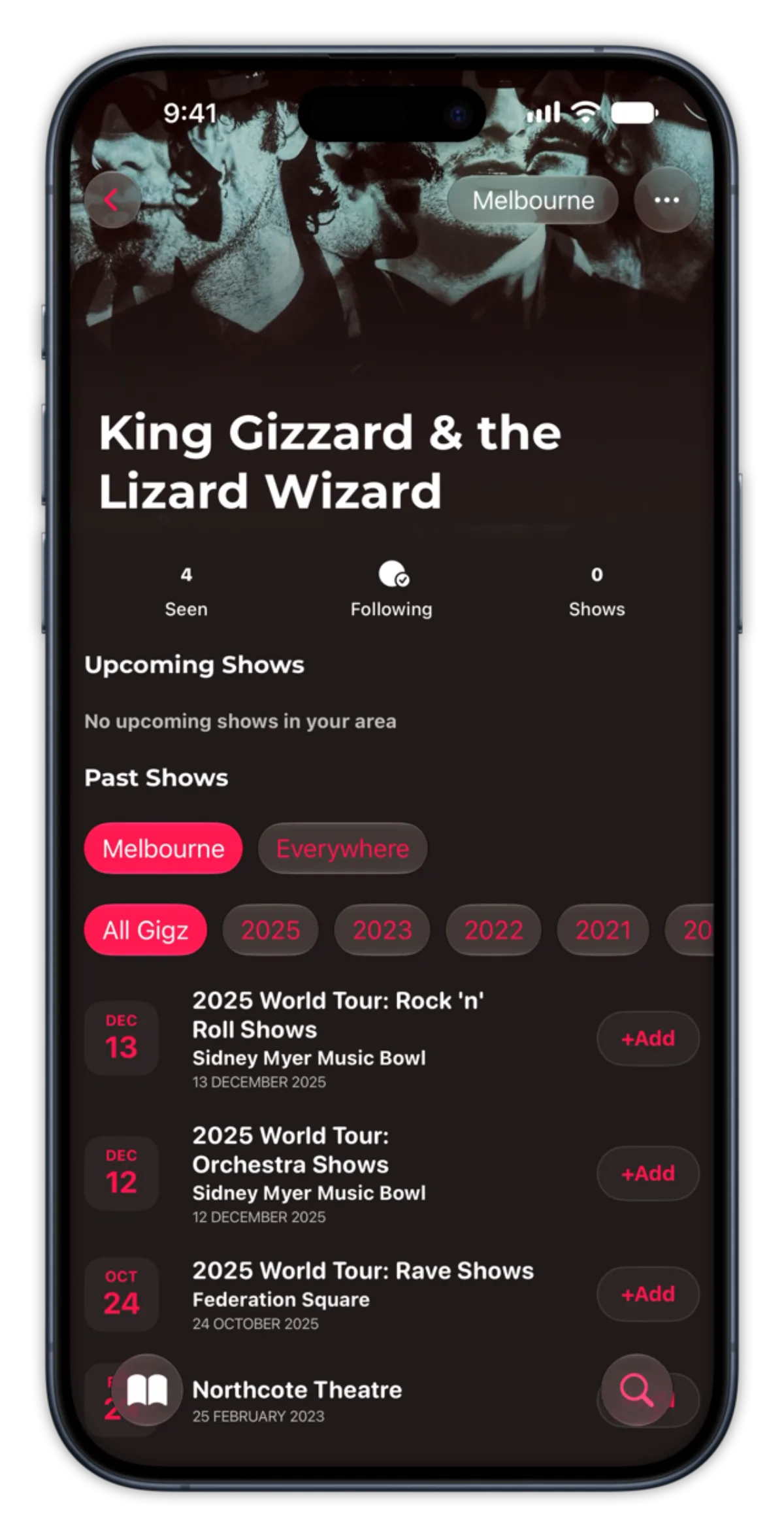
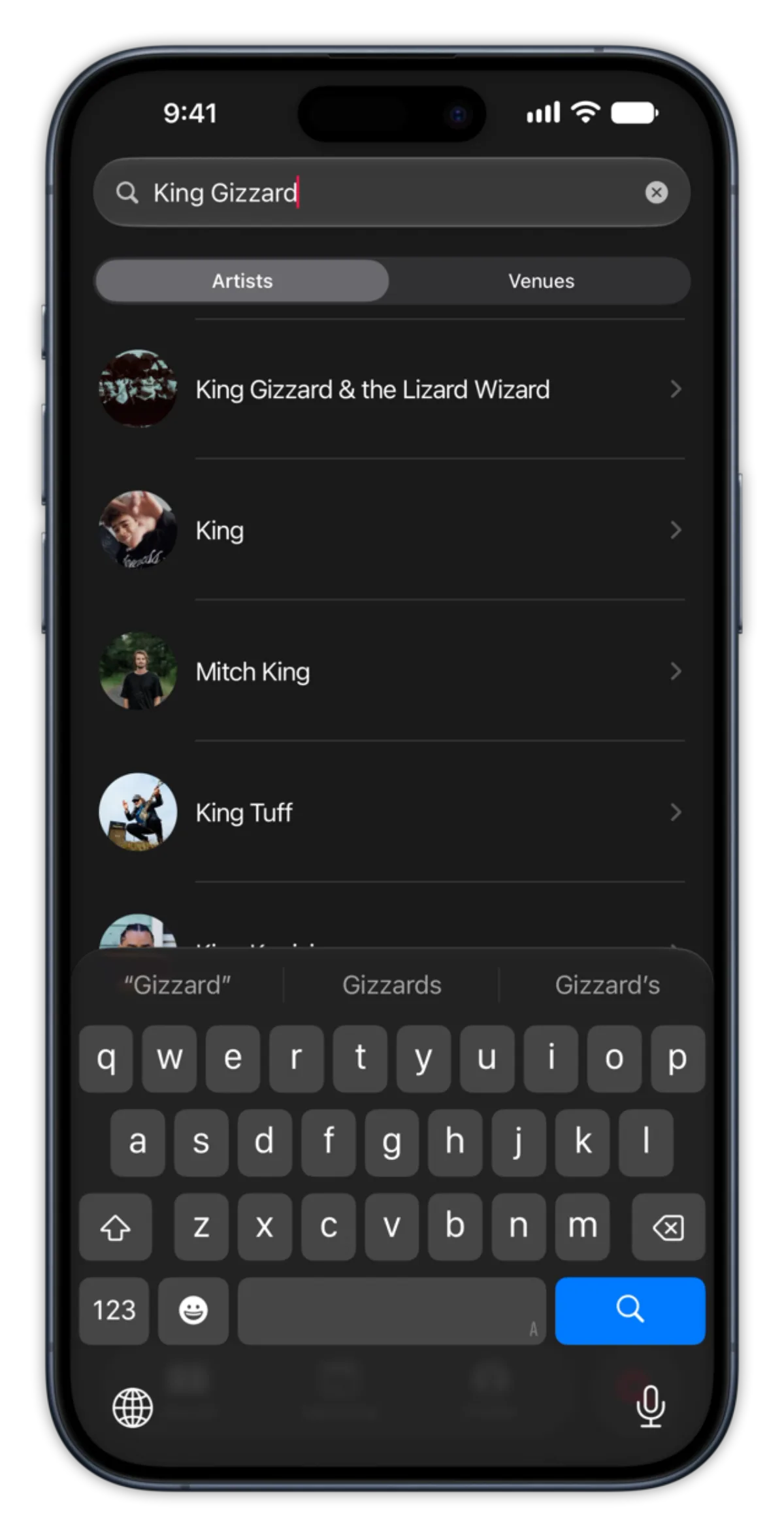
In version 1, adding a show meant typing everything in from scratch: artist, venue, date, setlist. In 2.0, you search for an artist and see every show they've played in your city. Tap the one you were at, and the artist, venue, date, and setlist all come with it.
Why this works: recognition is easier than recall. Seeing “Forum Theatre, 14 March 2019” in a list snaps the memory back in a way a blank text field never will. And because every show now comes from the same structured record instead of a hand-typed guess, the data is consistent enough to actually build stats on.
Stats and achievements
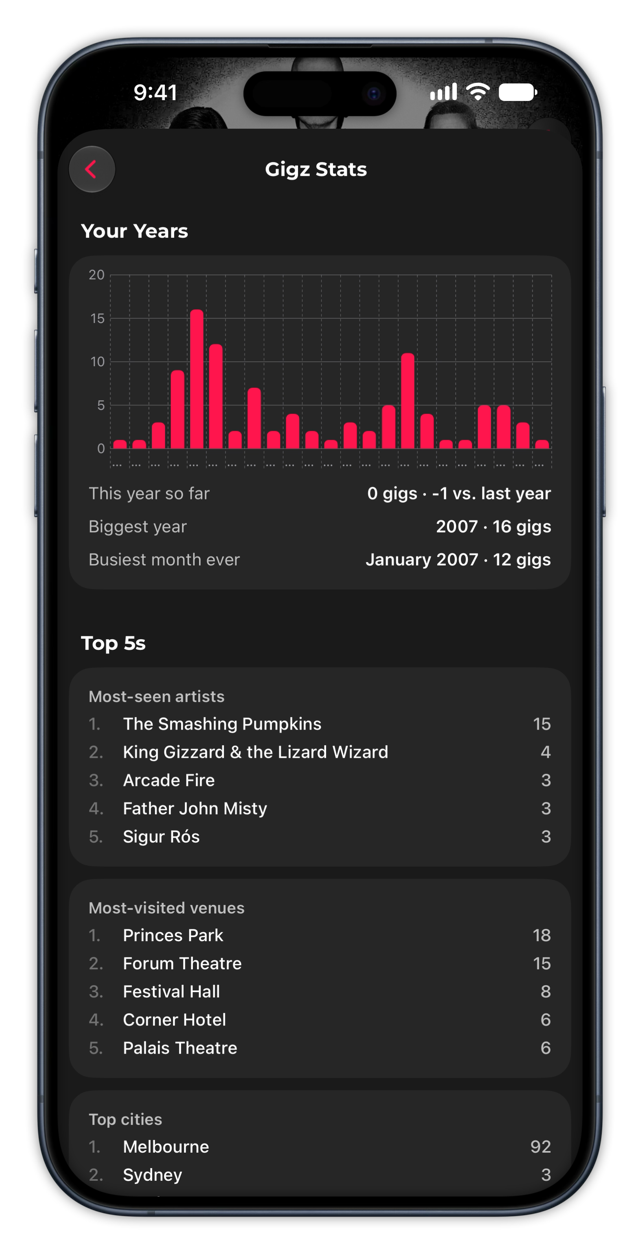
None of this was possible in version 1, because a spreadsheet of typed-in text isn't data you can do anything with. Once every show is a real, structured record, the app can show people patterns across their own history: shows attended by year, their top 5 artists, their top 5 venues. Numbers that only mean something because the records behind them are consistent.
Social, kept quiet
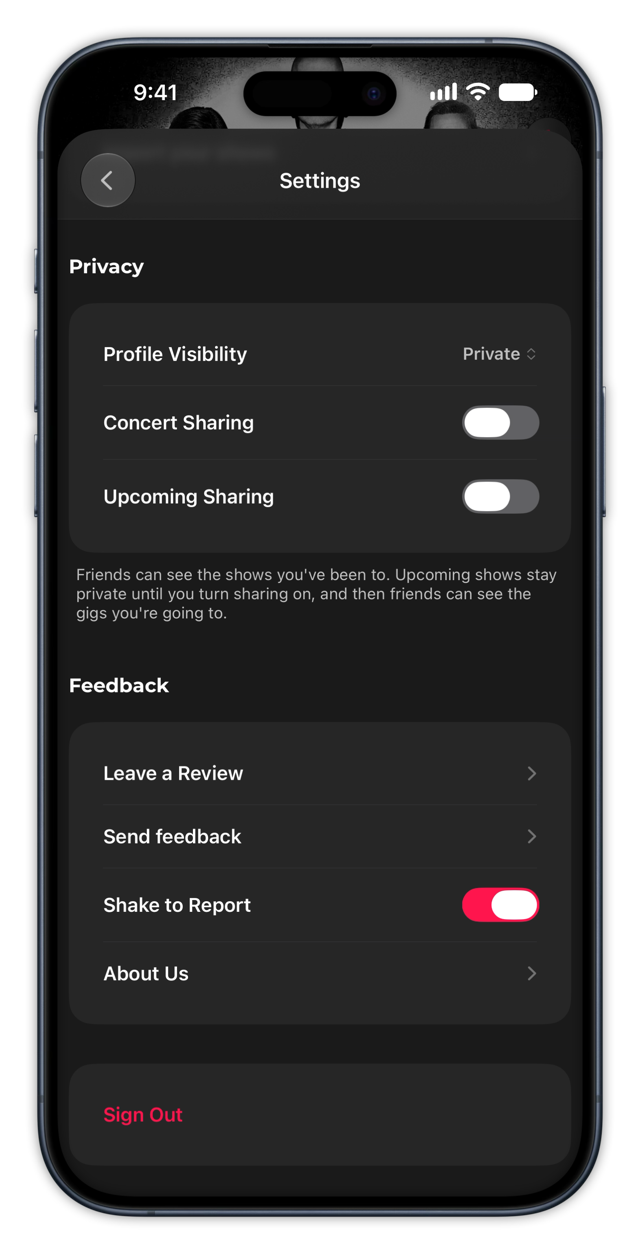
Version 1 deliberately shipped with no social features at all. The journal had to work for an audience of one before it worked for two. 2.0 adds social, but under rules designed to stop a personal journal turning into a performance:
- Friendships are mutual. There's no following, only agreeing to connect.
- A friend can see your attended shows, and only the ones you've chosen to share.
- Upcoming shows are private by default, with access granted per friend.
- Nothing is public. No discover tab, no follower counts, no profile anyone can stumble onto.
The reasoning: a past show is a memory. A future show is a plan, and plans are more sensitive. They say where you'll be and when. Social in Gigz lives where you go looking for it, not on the home screen.
Upcoming shows
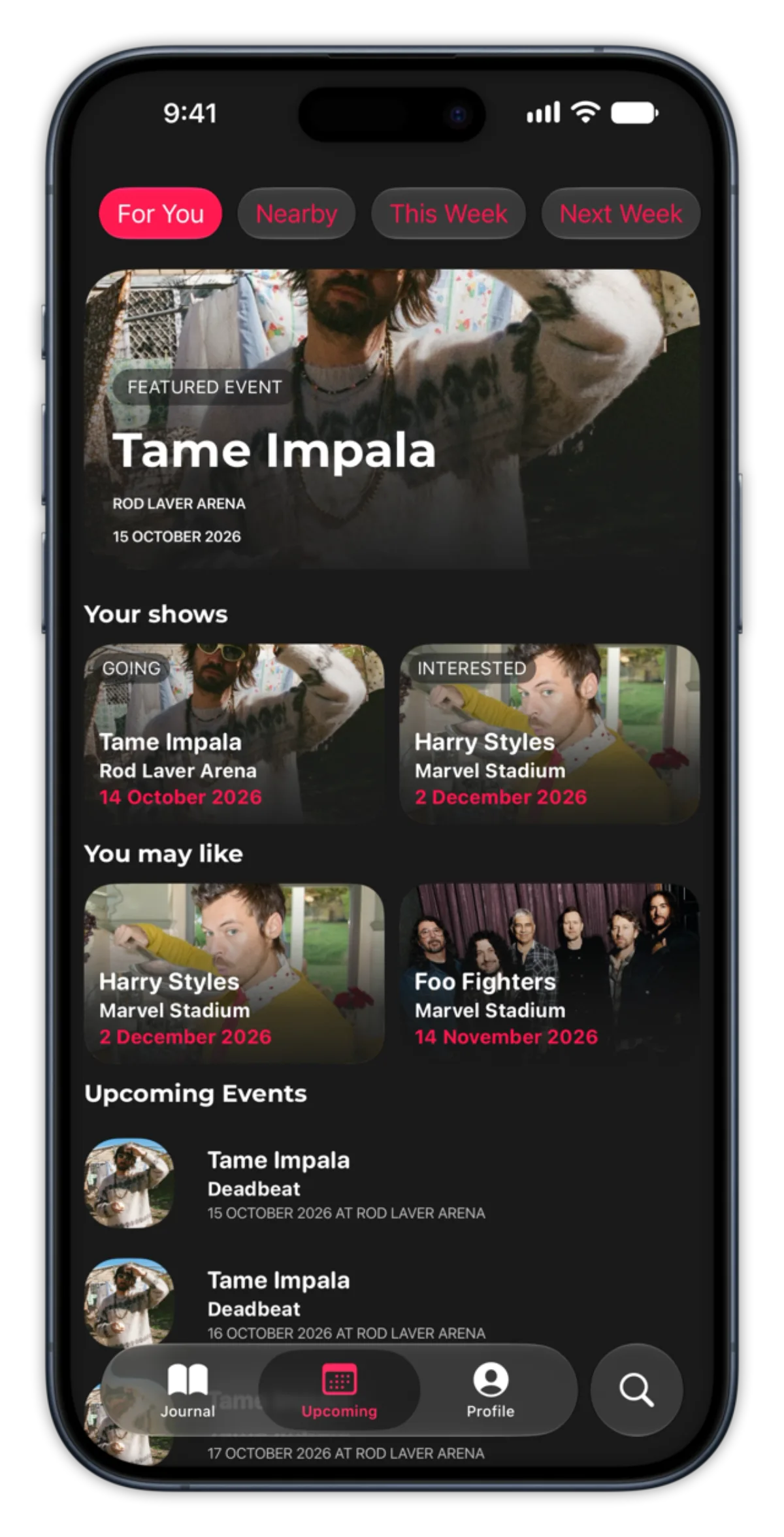
2.0 lets you follow artists and see their announced dates in your city, so a show moves from upcoming to attended the night it happens instead of being typed in after the fact. It closes the loop the version 1 research kept surfacing: people wanted to know about a tour before it was already over.
TESTING
I tested Gigz continuously rather than in one big round: informal sessions with friends and family watching them add their very first show, and several TestFlight builds put in front of real users who lived with the app over time.
What I watched for
Could someone log their first concert without any instruction? Where did they hesitate? What did they expect to tap that wasn't there? I paid less attention to what people said and more to where they got stuck.
What testing changed
The most important finding was an authentication failure I'd never have caught on my own devices:
- Original design: Sign in with Apple + a one-time code via SMS.
- Problem discovered: some testers on certain carriers silently never received the SMS codes. This was a hard blocker. They literally couldn't get into the app, and most wouldn't have reported it; they'd have just left.
- Decision: I removed SMS OTP entirely and switched to email-based codes. Less flashy, but universally reliable.
The lesson: don't let a “nice to have” auth method create a “can't get in” experience. Beyond auth, testing reinforced two bets: the card timeline genuinely delighted people on first scroll, and retroactive logging had to be near-frictionless, confirming the design choices the rest of this case study is built on.
Sign-in today
Sign-in now offers Apple and Google as the primary options, with the email one-time code kept on as the reliable fallback rather than the default path.
ACCESSIBILITY
I built Gigz to be a good iOS citizen from the start, and I treat accessibility as an ongoing craft rather than a box to tick.
What I addressed
- Touch targets: sized interactive elements to comfortable minimums so the app works one-handed and forgives less precise taps.
- Dynamic Type: text respects the user's system text-size setting, so the timeline stays legible for people who run larger fonts.
What I'm still improving
A full VoiceOver pass, a formal contrast audit across photo-backed cards, and a WCAG-style review are next on my list. I'd rather be honest that accessibility is a craft I'm actively levelling up than claim a finished bill of health. 2.0's move to iOS 26 and Liquid Glass makes the contrast audit more relevant than ever, since translucent materials can quietly erode the contrast a photo-backed card relied on.
DECISIONS
What I built
- Concert journaling with a year-grouped list : the core experience, with scrollable year pills for fast navigation
- Setlist tracking & integration : auto-populated where possible, manually editable where not
- Photo uploads with cover photo personalisation : 1 photo free, up to 15 on premium, user-selected cover
- Venue database & search: powered by multiple APIs (MusicBrainz, OpenStreetMap) for comprehensive coverage
- Search-and-add show entry: replaces manual input with recognition
- Stats and achievements: built on top of consistent, structured show records
- Friends: mutual-only, private-by-default sharing
- Upcoming shows & artist following : see announced dates for artists you already follow
What I left out of version 1, and why some of it came back
- Social features: no sharing, no friends list, no public profiles in version 1. The journaling experience needed to be solid before adding social layers, and adding social too early risks turning a personal journal into a performance. 2.0 adds social only now that the privacy model (mutual friends, private by default) exists to answer that risk directly.
- Discovery / recommendations : still left out. Upcoming shows are for artists you already follow, not the app suggesting new ones to you. The app stays about your history and your choices, not a feed.
- Unlimited photo uploads : still not unlimited, but 2.0 turned the flat cap into a tier: one photo free, up to 15 on premium, instead of the same limit for everyone.
OUTCOMES
What shipped
Gigz is live on the App Store , a fully functional concert journaling app that lets music fans log, revisit, and personalise their concert history.
2.0 is a full rebuild: a new data model and backend, the search-based Add flow, stats, friends, and upcoming shows, all redesigned around iOS 26. One backend holds every visibility rule, so when the Android app ships, it inherits the same privacy model rather than needing its own version of those decisions.
What I learned
- Constraints are design tools. The photo cap and the decision to cut social features weren't just cost-saving measures. They sharpened the product's identity. Gigz is a personal journal, and every decision reinforced that.
- Test authentication early and broadly. The SMS OTP issue could have been a launch blocker if I hadn't caught it in TestFlight. Auth is infrastructure, but it's also a UX surface.
- Scaling UX matters from day one. The timeline scaling challenge wasn't a “nice to have”. It was the difference between an app that works for casual users and one that works for everyone. The solution changed between versions; the lesson didn't.
- Remove input rather than polish it. The best fix for the add-a-show form was to not have one.
- Decide what friends can't see before deciding what they can. Privacy defaults are a design decision, not a settings screen.
What's next
- On This Day: a memory resurfaced on its anniversary, with a shareable Gigz ticket stub designed for that show
- More cities (Australian cities only at the moment)
- Android app
- Links to ticket platforms for upcoming shows
- Reminders when a followed artist announces a tour
More projects
Browse the rest of my work or get in touch.